Facebook marketing works best when a business combines an active Page with paid ads and measures whether those ads lead to meaningful actions. To understand how Facebook marketing works, look beyond the creative: campaign objectives guide delivery, audience settings shape who sees an ad, and conversion tracking connects clicks to outcomes.
It’s easy to focus on likes, reach or clicks. These metrics show whether an ad attracts attention, but they don’t tell the whole story. A clear objective and reliable tracking help you assess whether a campaign supports a business goal, such as generating enquiries or encouraging purchases.
This guide explains how organic Pages and paid campaigns work together, how to choose an objective and audience, and how to use conversion tracking to assess performance. You’ll also learn how to review results and make informed campaign adjustments for a business in Singapore.
Key Takeaways
- Match your audience settings to the campaign goal, then refine targeting based on performance.
- Choose a Meta Ads Manager objective that aligns with the action you want people to take.
- Use clear, format-appropriate ad creative and copy to make your message easy to understand.
- Keep your Facebook Page active so paid campaigns lead to a useful, consistent brand experience.
- Set up conversion tracking to connect ad activity with meaningful actions on your website.
How do you target the right audience with Facebook ads?
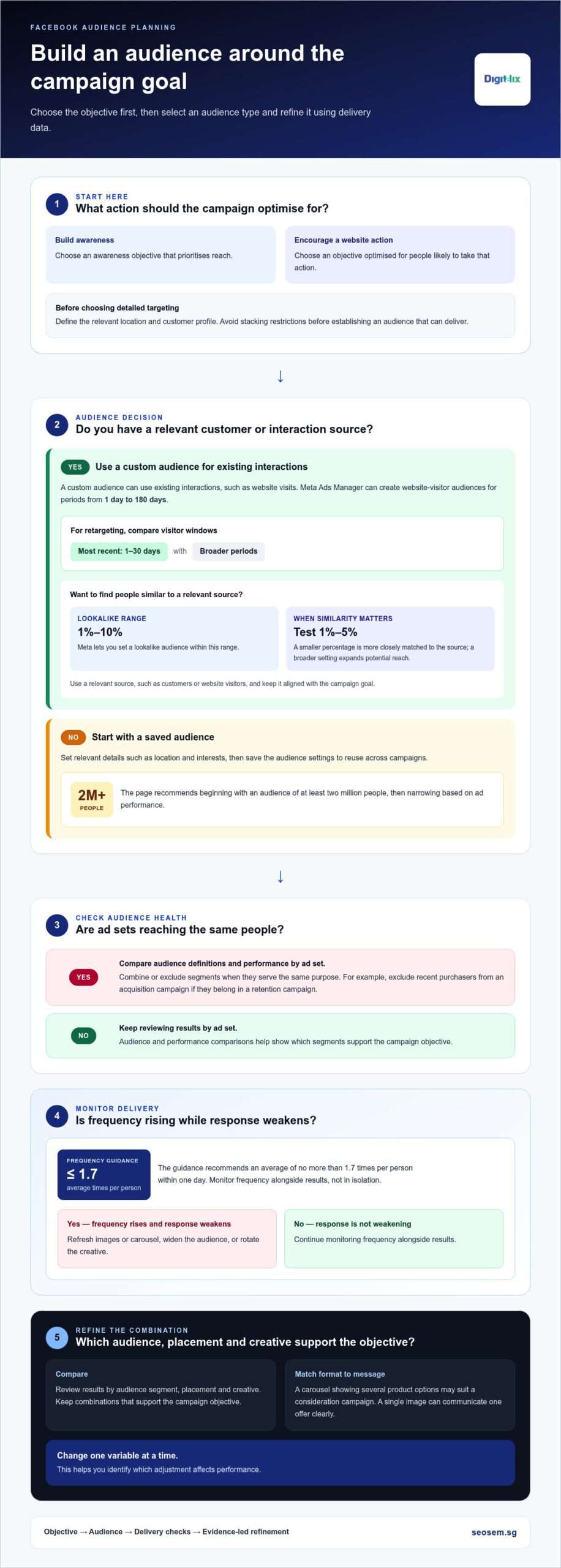
Build audience targeting around the campaign objective, then refine it using delivery data. In Meta Ads Manager, you can choose saved, custom and lookalike audiences.
-
Choose Facebook Marketing Objectives and Audience Options
Start by selecting the campaign objective, which tells Meta what outcome to optimise for. An awareness campaign prioritises reach, while a campaign focused on website actions is optimised for people likely to take those actions. For a Singapore business, define the relevant location and customer profile before adding detailed targeting. Avoid stacking restrictions before establishing an audience that can deliver.
- Compare the available audience types against your objective. A saved audience keeps chosen settings, such as location and interests, for reuse across campaigns. A custom audience uses existing interactions, such as website visits. Meta Ads Manager can create website-visitor audiences for periods from 1 day to 180 days. For retargeting, start by comparing visitors from the most recent 1-30 days with broader periods.
- Create a lookalike audience from a relevant source, such as customers or website visitors. Meta lets you set lookalike audiences from 1-10% of the source audience; test 1% to a maximum of 5% when similarity matters. A smaller percentage is more closely matched to the source, while a broader setting expands potential reach. Keep the source aligned with the campaign goal, rather than using every available contact.
-
Review Facebook Marketing Audience Overlap and Ad Frequency
Before increasing reach, check whether separate ad sets target the same people. Overlapping audiences can make campaigns compete for similar users and obscure which audience drove results. In Ads Manager, compare audience definitions and performance by ad set, then combine or exclude segments when they serve the same purpose. For example, exclude recent purchasers from an acquisition campaign if they belong in a retention campaign.
- Monitor frequency alongside results, not in isolation. The guidance recommends keeping Facebook ad frequency to an average of no more than 1.7 times per person within one day. If frequency rises while response weakens, refresh the images or carousel, widen the audience, or rotate the creative. Avoid changing several settings at once, so you can identify which adjustment affects performance.
- Optimise the audience and content together. Compare results by audience segment, placement and creative, then keep the combinations that support the objective. A carousel showing several product options may suit a consideration campaign, while a single image can communicate one offer clearly. Treat a broad starting audience as a test, not a fixed rule: the page recommends beginning with at least two million people, then narrowing based on ad performance.
Campaign objectives and setup in Meta Ads Manager
Meta Ads Manager organises campaigns around an objective, audience, placement and bid strategy. Facebook ad targeting determines who may see an ad; placements determine where it appears, while bidding guides delivery in Meta’s ad auction.
-
Set Up a Facebook Marketing Campaign in Meta Ads Manager
Open Meta Ads Manager and create a campaign for one business outcome. Choose an objective that matches the action you want, such as building awareness, attracting website visits or generating leads. At the ad set level, configure the audience, placements, schedule and budget. At the ad level, add the creative, copy and destination, such as a landing page.
Before publishing, check that the objective, destination and call to action support the same goal. For example, an ad promising a product enquiry should send people to a page with a clear enquiry route. Review each campaign setting before submission: a mismatch can steer attention towards clicks rather than the intended business result.
-
Choose Facebook Marketing Objectives, Targeting, Placements, and Bidding
Select the objective first, then align targeting with the outcome. Meta uses the objective to guide delivery towards people more likely to complete that action. Choose placements to show ads across eligible Meta surfaces, or use automatic placements to let the system distribute delivery. Check that your creative suits each placement, since a vertical format may not fit every position.
Meta’s auction considers your bid, estimated action rates and ad quality when deciding delivery. A higher bid alone doesn’t ensure results. Choose a bidding approach that fits your goal, then track the cost and quality of outcomes. Avoid changing objectives mid-test, as this changes what the campaign is optimising for and makes comparisons harder.
-
Publish and Manage Facebook Marketing Campaigns
Publish only after reviewing the campaign, ad set and ad levels in Ads Manager. Meta reviews ads before delivery; an ad still under review should generally complete review in about 24 hours. Once approved, monitor the selected objective’s results, cost per result, click-through activity and landing-page actions.
Allow the campaign to gather useful signals before making large edits. The learning phase usually ends after an ad receives 50 results for its selected objective in one week. Let ads run for 3-7 days while monitoring metrics; campaigns can take three to seven days to exit learning, with stronger optimisation potentially emerging after one to two weeks. Change one variable at a time. For structured campaign planning, explore support with campaign planning.
What is advertising on Facebook?
Facebook marketing combines organic Page posts with paid ads displayed across Meta’s platform and network. Ads use a chosen format and message to build brand awareness or encourage an action, such as visiting a website.
-
Choose Facebook Ad Formats
Select a format that presents your offer clearly: use an image for one product or message, a video to demonstrate a service, or a carousel to show multiple items. Facebook carousel ads use at least 2 images, making them useful for presenting a product range or several benefits. Match the format to the objective, and avoid adding extra cards or scenes that distract from the main action.
-
Pair Ad Formats with Placements
Check how each creative will display in its selected placement before publishing. A square image or video can suit feed placements, while vertical creative is designed for full-screen viewing. Facebook recommends image and video ad assets at a minimum size of 1080 x 1080 pixels. Preview the ad across placements, since cropping may hide important text or product details.
-
Shape Ad Copy and Post Formats
Write copy around one clear benefit and one next step. Facebook recommends image-ad captions under 125 characters, headlines at 40 characters and descriptions at 30 characters. Put the key message first, then use a direct call to action. For example, a Singapore café promoting a new lunch menu could pair a dish image with copy inviting people to view the menu.
- Use video when movement helps explain the offer. Facebook recommends keeping video ads under 15 seconds. Make the opening show the product, service or problem immediately, then add captions to make the message easier to follow without sound. Keep the final frame focused on one action, such as booking or learning more.
- Plan organic post formats separately from paid creative. A Facebook Page can publish photo posts, videos and carousels, while an ad can add campaign-specific copy and a destination. The recommended photo-post size is 1200 x 325 pixels, with a minimum of 600 x 315 pixels. Check the preview on mobile and desktop so key details remain visible in each display.
- Review the format against the campaign goal before launch. An awareness campaign needs recognisable branding and a message people can grasp quickly; a response-focused ad needs a relevant destination and clear action. Compare formats, such as image versus carousel, while keeping the audience and objective consistent. This makes each test more useful when deciding which creative to refine next.
Organic Facebook Pages and paid advertising
Use your Page to build a consistent brand presence, then use paid advertising to extend selected messages. A Singapore SME can combine regular updates with campaigns aimed at specific business outcomes.
Meta’s advertising standards govern which ads can run, so check restricted content and targeting rules before publishing. For marketing in Singapore, handle personal data carefully: explain its use, respect consent choices, and use uploaded customer details only when you have permission.
Create a Facebook business Page with accurate business details, then connect it in Meta Business Suite. Use the Suite to organise publishing and manage business access.
Reduce common risks by matching each ad to its destination and objective. For example, send a promotion to a page that clearly explains the offer, rather than to a general homepage.
-
Compare Organic Pages and Paid Advertising
Plan organic posts and paid campaigns as separate but connected activities. A Page lets a business publish updates and maintain a visible presence; paid ads use budget and targeting to distribute selected content beyond existing followers. For example, post regular service updates organically, then promote a timely offer to a defined audience. Keep Page information current before directing ad traffic there.
-
Weigh Advertising Benefits, Reach, and Drawbacks
Use Facebook advertising when you need controlled distribution and measurable campaign activity. Facebook advertising can reach over 3 billion monthly active users, but potential reach doesn’t equal relevant reach. Auction delivery, audience choices and creative quality affect performance. Set an outcome before spending, then compare cost and actions against that goal. Avoid treating impressions or likes as proof of business impact.
Set a Singapore media budget that supports a meaningful test. Keep spending consistent during the test so results remain interpretable, and pause or adjust campaigns that attract attention without useful actions.
-
Choose Facebook Advertising Formats
Choose the format that best presents the message: image ads for one clear offer, carousel ads for several products, and video ads for demonstrations. Facebook carousel ads require at least 2 images. Keep each card relevant and connect the final card to the same action as the ad. Preview the creative in its placement to catch cropping or unreadable text.
Test one format against another while holding the audience and objective steady. For example, compare a product carousel with a short video, then assess which drives more qualified visits, not just more views.
-
Create a Business Page and Set Up Business Suite
Create a Facebook Page using the business name, category, contact details and description customers need. Add a profile image and cover image that identify the business clearly. Then connect the Page to Meta Business Suite, organise access for the people managing it, and review permissions before assigning roles.
Use the Suite to schedule Page content and monitor incoming activity. Before launching an ad, check that the Page destination, business details and campaign message agree. This simple review helps prevent mismatched offers and avoidable customer confusion.
Facebook Pixel and conversion tracking
The Meta Pixel helps connect website activity with Facebook campaigns. Understanding how Facebook marketing works means tracking meaningful conversions, not just engagement or clicks. Use event data to assess which ads contribute to actions on your website.
- Define the conversion before installing tracking. Choose a business action, such as submitting an enquiry form or completing a purchase. For a Singapore service business, a completed booking request may matter more than a landing-page view. This decision determines which event to monitor and which campaign results deserve attention.
- Install the Meta Pixel on your website and connect it to the relevant Meta advertising account. Add it through your website platform’s integration or the site’s code, depending on how the website is managed. Check that the Pixel connects to the correct site and account; otherwise, events may appear in the wrong reporting view.
- Configure events for steps that reflect customer intent. A page view can show initial interest, while a lead or purchase event records a more valuable action. For example, track a successful enquiry confirmation rather than every visit to the contact page. Test the event by completing the customer journey yourself, then confirm that it registers.
- Compare conversions with clicks and engagement in Meta Ads Manager. A strong click-through rate can attract visitors, but it doesn’t prove they completed a form or purchase. Review the path from ad impression to click, landing-page visit and tracked conversion. If clicks rise but conversions remain low, inspect the destination page and its next step.
- Use Pixel audiences to understand returning website visitors and support retargeting. For example, someone who viewed a service page but didn’t enquire may need a different message from someone who already converted. Exclude completed leads where appropriate. This keeps acquisition messages focused on prospects who haven’t yet taken the intended action.
- Separate organic activity from paid campaign outcomes in your reports. Page engagement, Messenger conversations and website conversions describe different actions. A Messenger enquiry may need manual outcome tracking if the final sale happens offline. Record qualified enquiries and completed sales alongside Ads Manager results, so your team can distinguish attention from commercial progress.
- Review tracking whenever the website journey changes. A redesigned form, new confirmation page or checkout update can affect event reporting. Test the revised path before judging campaign performance, and keep the conversion definition consistent across reporting periods. To understand how Facebook marketing works in practice, follow each tracked action through to its business outcome.
Digitalix: Search Engine Optimization (SEO)
Digitalix provides Search Engine Optimization (SEO) for businesses building visibility beyond social media campaigns. SEO can complement Facebook activity when customers also search Google for a product, service or local business. Facebook Marketing supports audience engagement and paid reach, while SEO helps relevant pages appear in organic search results. Together, these channels give Singapore businesses different ways to connect with potential customers.
Consider SEO when your website needs to attract people researching a specific service, or when you want search visibility to support campaign activity over time. Digitalix can align SEO with Facebook Marketing and Search Engine Marketing (SEM), giving each channel a clear role in your digital marketing strategy.
Contact Digitalix to discuss your marketing priorities or visit seosem.sg.
Turn Your Facebook Strategy Into a Practical Next Step
If you’re deciding how Facebook marketing works for your business, start with a forward-looking question: what should a prospect do after seeing your brand? Build the next campaign around that action, then assess whether the customer journey supports it from first interaction to follow-up.
That planning also clarifies where Facebook fits alongside other channels. Digitalix offers Search Engine Marketing (SEM), Search Engine Optimization (SEO), and Shopee Management for businesses seeking coordinated visibility across paid search, organic search and marketplace activity. Give each channel a distinct role rather than expecting one platform to serve every buying stage.
A focused discussion can turn your campaign into a practical plan: define the audience, choose the business action and set a measurement approach that reflects your sales process. Then prioritise improvements using campaign evidence and business needs. This creates a framework your team can refine as customer priorities shift.
Take the next step with a clear objective and a strategy built to learn and improve.
Frequently Asked Questions
What are Facebook and Facebook Marketing?
Facebook is a social media platform where people and businesses share content and interact. Facebook Marketing uses business Pages and paid campaigns to reach audiences, encourage engagement or prompt actions. For example, a Singapore retailer might post product updates organically, then advertise a seasonal offer to people likely to be interested. The key distinction is between publishing content and paying to distribute it to a selected audience.
How do you set up Facebook ads in Meta Ads Manager?
Set up an ad by connecting the business Page and advertising account, then creating a campaign around one measurable business outcome. Prepare the destination before writing the ad, such as a product page with current availability or a form that works on mobile. Name campaigns consistently so reporting stays readable, for example by recording the promotion and audience type. Review the completed ad preview and destination before submitting it.
How do you write effective Facebook ad copy?
Write copy that names the audience’s need, gives a specific reason to care and makes the next action clear. For example, a local tuition provider could state the subject and class format, then direct parents to enquire about a suitable class. Keep claims consistent with the landing page and remove details that don’t help someone decide. Test different opening messages separately so results show which value proposition resonates.
Is S$5 or S$10 a day enough for Facebook ads?
S$5 or S$10 a day can support a small-scale test or early audience learning, but it may produce limited conversion data. Whether that spend is useful depends on the campaign objective, auction competition and the action’s cost. A test focused on reach needs different evidence from one seeking purchases. Judge the budget by whether it can generate enough relevant activity to guide a decision, not by clicks alone.
What affects your Facebook ad costs?
Facebook ad costs vary because ads enter an auction rather than following one fixed rate. Competition for the audience, the bid approach, the likelihood of the desired action and the ad’s relevance can all affect delivery costs. A campaign targeting a narrow, highly sought-after audience may behave differently from one with broader eligibility. Compare cost per meaningful result across campaigns, and account for lead quality rather than judging by impressions alone.
What are Messenger ads?
Messenger ads are Facebook or Instagram ads designed to start or encourage conversations in Messenger. A user can tap the ad and open a chat, where the business can answer questions or guide the person towards an enquiry. They suit offers where people need clarification before deciding, such as appointment options. Prepare a clear opening message and a process for handling conversations, so incoming interest receives a useful response.
What are Stories ads?
Stories ads appear in the full-screen Stories experience on Facebook and Instagram. Their vertical 9:16 format uses the screen differently from a standard feed image, so keep essential text and branding easy to see. Facebook Stories disappear after 24 hours, but an ad campaign’s delivery is controlled separately through its campaign settings. Use a direct visual and one clear action, then preview the creative in the intended placement before running it.
What are the main types of Facebook marketing: organic posts, ads, and boosted posts?
Organic posts are unpaid updates published on a Facebook Page. Ads are paid campaigns built with defined objectives, targeting and delivery settings. A boosted post is an existing Page post given paid distribution, usually to increase its reach or engagement. Choose organic posts for ongoing updates, ads when you need campaign-level control, and boosting when a particular post merits added visibility. Track the outcome that matters rather than assuming more reactions mean more business.